
Are your LED lights flickering and causing frustration? Flickering lights can be more than just annoying—they might signal a problem that needs your attention.
You don’t have to be an expert to figure this out. In this guide, you’ll discover simple, effective steps to identify why your LED lights are flickering and how you can fix them quickly. Keep reading, and you’ll gain the confidence to tackle this common issue yourself, saving time and money.
Your home’s lighting can feel steady and reliable again—let’s get started!
Common Causes Of Flickering Led Lights
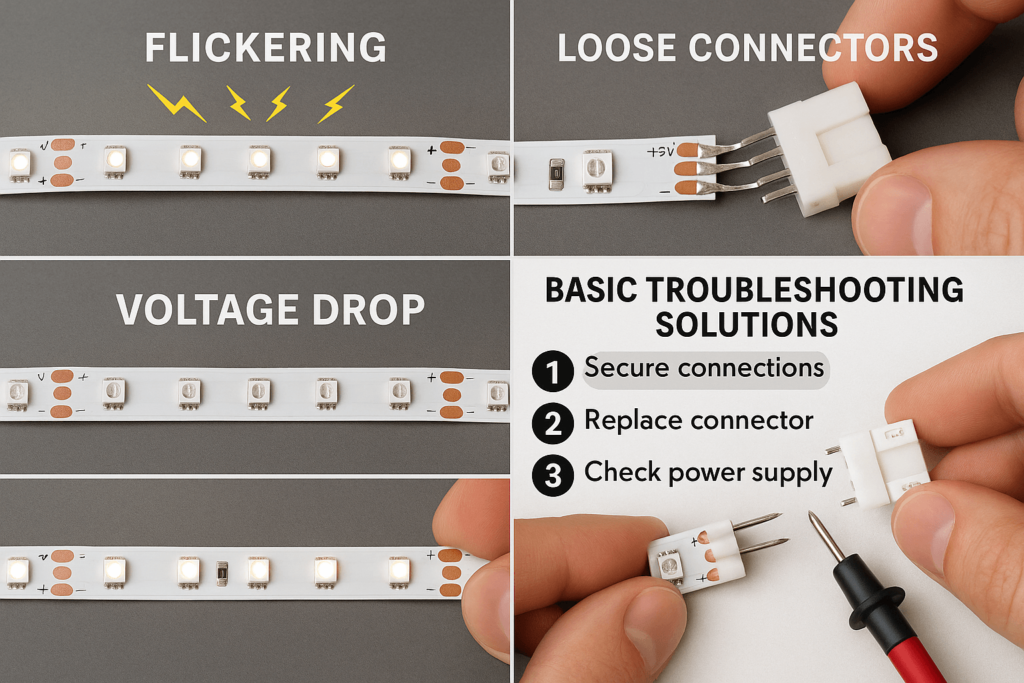
Loose connectionscan cause flickering by disrupting the power flow. Wires may be loose at the fixture or switch. Tightening these can stop flickering.
Faulty dimmer switchesoften cause LED lights to flicker. Not all LEDs work with old dimmers. Replacing the dimmer with an LED-compatible one helps.
Voltage fluctuationshappen when power supply varies. This can cause lights to flicker or blink. Checking the home’s voltage with a tester can identify this issue.
Incompatible fixturesmay not work well with certain LED bulbs. Some older fixtures cause flickering. Using fixtures made for LEDs solves this problem.
Defective bulbsare another reason for flickering. A bad LED bulb can flicker even with good wiring. Replacing the bulb usually fixes this.

Credit: www.youtube.com
Tools Needed For Troubleshooting
Multimeterhelps check electrical current and voltage. It finds if power flows correctly through wires and bulbs.
Screwdriversare needed to open light fixtures and remove covers. A good set includes both flathead and Phillips types.
Replacement Bulbscome handy if the old bulbs are faulty. Keep spare bulbs to test and swap quickly.
Wire Strippersremove insulation from wires safely. They help repair or connect wires without damage.
Step-by-step Fixes
Loose connectionsoften cause flickering LED lights. Check all wires and connectors carefully. Tighten any loose screws or terminals. Ensure the bulbs are firmly seated in their sockets. This simple action can fix many flickering problems quickly.
Dimmer switches may not work well with some LED bulbs. Test the dimmer by replacing it with a standard switch. If the flickering stops, the dimmer is the issue. Use LED-compatible dimmer switches for best results.
| Voltage Range | Effect on LED Lights |
|---|---|
| Below 110V | Lights may flicker or dim |
| 110V – 130V | Normal operation |
| Above 130V | Lights may flicker or burn out |
Measure the voltage with a multimeter. Stable voltage means no flickering. Unstable power can cause the lights to blink or flicker.
Some fixtures do not support LED bulbs. Swap out old fixtures for LED-compatible ones. This prevents flickering and extends bulb life.
Defective LED bulbs flicker even after fixing other issues. Replace any bulb that still flickers. Use good quality LEDs for longer life and better light.
Preventing Future Flickering
Checking and securing all wiring connections helps avoid flickering in LED lights. Using quality bulbs and stable power sources reduces future flicker issues. Regular maintenance keeps your lighting steady and reliable.
Use Compatible Dimmer Switches
Ensure the dimmer switch is LED compatible. Not all dimmers work with LEDs. Check the packaging or manual. This prevents flickering issues.
Ensure Proper Wiring
Check wiring connections are tight and secure. Loose wires can cause flickering. Hire an electrician if unsure about wiring.
Choose Quality Led Bulbs
Invest in high-quality LED bulbs. Cheap bulbs often flicker more. Look for brands with good reviews and warranties.
Regular Maintenance Tips
- Dust the bulbs and fixtures regularly.
- Check for loose sockets.
- Replace old or damaged bulbs promptly.
When To Call A Professional
Signs of electrical issuesinclude constant flickering, buzzing sounds, or lights dimming unexpectedly. These may signal loose wiring or overloaded circuits. Sparks near switches or outlets also need attention. Flickering that affects multiple lights at once often points to bigger problems.
Safety precautionsmatter. Turn off the power at the breaker box before touching any wiring. Avoid using damaged bulbs or fixtures. Use insulated tools and wear rubber-soled shoes to reduce shock risk. Never ignore sparks or burning smells.
Finding a qualified electricianmeans checking licenses and reviews. Ask about experience with LED lighting. Get multiple quotes to compare prices fairly. A good electrician will explain the problem and fix it safely and quickly.

Credit: lightbulbsurplus.com
Credit: www.elstarled.com
Frequently Asked Questions
Why Are My Led Lights Flickering Intermittently?
LED lights flicker due to loose connections, voltage fluctuations, or incompatible dimmers. Check wiring and switch to compatible dimmers for stable lighting.
Can A Faulty Driver Cause Led Flickering?
Yes, a faulty LED driver can cause flickering. It regulates power to the LED. Replace it if flickering persists.
How Does Voltage Fluctuation Affect Led Lights?
Voltage fluctuations cause inconsistent power supply, leading to flickering. Use a voltage stabilizer or check your electrical system to fix this.
Will Replacing Bulbs Fix Flickering Led Lights?
Replacing bulbs may fix flickering if bulbs are old or damaged. However, also inspect wiring and drivers for a complete solution.
Conclusion
Flickering LED lights can be frustrating to deal with. Start by checking the bulb and wiring for any loose connections. Make sure the power source is stable and compatible with your LED lights. Sometimes, replacing the dimmer switch helps solve the issue.
Remember, safety comes first—turn off the power before inspecting. Small fixes often stop the flicker quickly. With these simple steps, you can enjoy steady, bright lighting again. Keep your lights shining without interruption. Troubleshooting becomes easy with a clear plan.
