
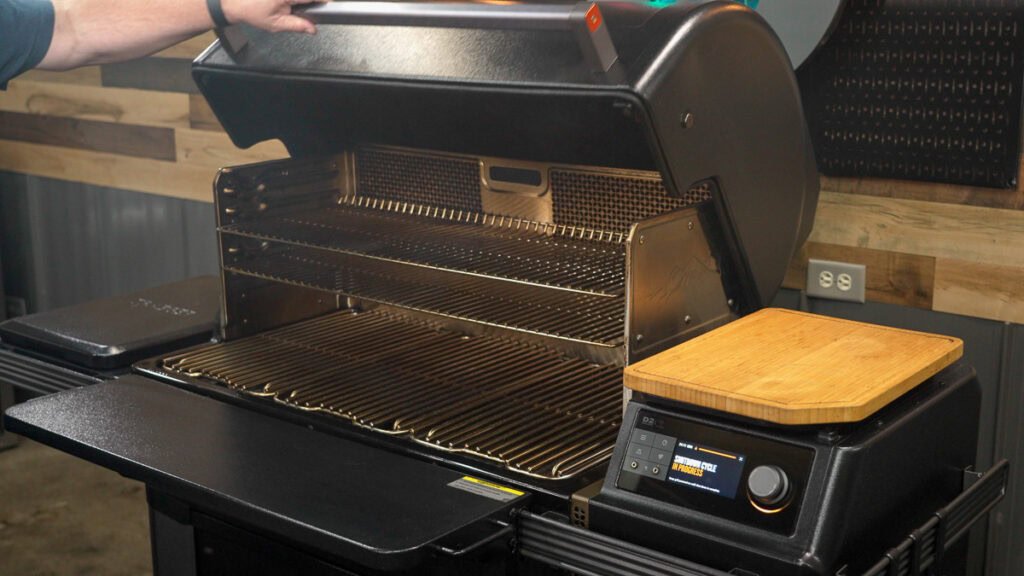
If you own a pellet grill, you know how important your digital controller is for perfect cooking every time. But did you know that a dirty controller can cause glitches, misread temperatures, or even stop working altogether?
Keeping your digital controller clean is key to making sure your grill runs smoothly and your food turns out just right. In this guide, you’ll learn simple, effective steps to clean your digital controller safely and quickly. Stick with me, and you’ll never have to worry about a faulty controller ruining your next barbecue.
Ready to get started?

Credit: www.smokedbbqsource.com
Tools Needed
Cleaning the digital controller on your pellet grill requires the right set of tools to ensure the job is done safely and effectively. Having the proper supplies not only makes the process smoother but also protects the delicate electronics from damage. Let’s look at what you should have on hand before you start.
Essential Cleaning Supplies
- Soft microfiber cloths:These are gentle on the controller screen and housing, preventing scratches while wiping away dust and grime.
- Isopropyl alcohol (70% or higher):Ideal for disinfecting and removing stubborn grease without leaving residue behind.
- Compressed air canister:Perfect for blowing out dust from tight spaces without touching sensitive components.
- Small, soft-bristled brush:Helps to loosen dirt in crevices and around buttons carefully.
- Plastic or wooden toothpicks:Useful for gently scraping dirt from narrow gaps without causing damage.
Optional Equipment
- Digital multimeter:Handy if you want to check for any electrical issues after cleaning the controller.
- Protective gloves:Keeps your hands clean and prevents oils from your skin transferring to the electronics.
- Screen protector film:Consider adding this after cleaning to keep your controller screen pristine longer.
- Small vacuum cleaner with brush attachment:An alternative to compressed air for dust removal, especially if you want to avoid air blasts.
Have you ever tried cleaning your controller with just a cloth and water? It might seem quick but can leave residue or cause moisture damage. Using these tools helps you avoid that risk and extends the life of your grill’s digital components.
Safety Precautions
Cleaning the digital controller on your pellet grill requires care. Following safety precautions protects both you and your grill. These steps help avoid accidents and damage during cleaning. Always prioritize safety before starting the process.
Power Off And Unplug
Turn off the pellet grill completely. Unplug it from the power source to stop electricity flow. This prevents electric shock and accidental activation. Wait a few minutes before cleaning to ensure no residual power remains.
Avoiding Damage
Use gentle cleaning tools like a soft cloth or brush. Avoid harsh chemicals that can harm the controller’s surface. Do not use water directly on the controller to prevent short circuits. Handle the controller carefully to avoid breaking buttons or screens.
Removing The Controller
Removing the digital controller from a pellet grill requires care and attention. This step allows you to clean the controller thoroughly and maintain its performance. Handle the controller gently to avoid damage to the electronics and wiring.
Locating The Controller
The digital controller is usually mounted on the front panel of the pellet grill. It displays temperature settings and controls the pellet feed system. Look for a small box with a screen and buttons near the grill’s main control area.
Check the user manual for exact placement if unsure. Some models hide the controller behind a protective cover or panel. Identify the screws or clips holding the controller in place before removal.
Detaching Carefully
Turn off the grill and unplug it from the power source before starting. This prevents electric shock and protects the controller’s circuits. Use a screwdriver to remove screws securing the controller to the grill.
Gently pull the controller forward to expose the wiring. Avoid tugging on wires. Disconnect wires carefully by pressing on connector clips or pulling from the plug, not the wires themselves.
Place the controller on a clean surface while cleaning. Keep screws and small parts safe to avoid losing them. Handle the controller with dry hands to prevent moisture damage.

Credit: www.smokedbbqsource.com
Cleaning The Controller
Keeping your pellet grill’s digital controller clean ensures optimal performance. Use a soft, damp cloth to wipe away dust and grime. Avoid harsh chemicals to protect the sensitive electronics.
Cleaning the digital controller of your pellet grill is crucial. It ensures optimal performance and longevity. A clean controller also enhances user experience. Dust and grime can affect its functionality. Regular cleaning keeps it in top shape. Follow these steps to clean your controller effectively.Wiping The Exterior
Use a soft, lint-free cloth for the exterior. Dampen the cloth slightly with water. Gently wipe the surface to remove dirt. Avoid using harsh chemicals. They can damage the controller’s finish. Ensure the cloth is not too wet. Excess moisture can seep inside.Cleaning The Screen
The screen can gather fingerprints and dust. Use a microfiber cloth for cleaning. It’s gentle and leaves no scratches. For stubborn spots, use a screen-safe cleaner. Spray the cleaner on the cloth, not directly on the screen. Wipe in circular motions for a streak-free finish.Handling Buttons And Dials
Buttons and dials need special attention. Use a cotton swab to clean between them. Slightly dampen the swab for better results. Be careful not to press too hard. A dry toothbrush can help remove debris. Gently brush around buttons and dials for thorough cleaning.Cleaning Internal Components
Cleaning the internal components of your digital controller on a pellet grill is key to maintaining its performance and extending its lifespan. Inside the controller, dust and moisture can build up, causing it to malfunction or respond slowly. Taking time to carefully clean these parts helps keep your grill running smoothly every time you fire it up.
Dust Removal Techniques
Dust is the most common enemy inside your digital controller. Use a can of compressed air to blow out dust from the circuit board and other sensitive parts. Hold the can upright and spray short bursts to avoid moisture buildup.
A soft brush, like a clean paintbrush or an anti-static brush, can gently sweep away stubborn dust without damaging components. Avoid using cloth or paper towels inside, as they can leave fibers behind.
Have you noticed your controller screen flickering or buttons sticking? Dust trapped inside might be the cause. Regularly removing dust can prevent these annoying issues from turning into costly repairs.
Checking For Corrosion
Corrosion can silently damage your controller’s internal components. Carefully inspect the circuit board and connectors for any greenish or white powdery buildup, which indicates corrosion.
If you find corrosion, lightly clean the area with a cotton swab dipped in isopropyl alcohol. Make sure the controller is completely dry before reassembling to avoid electrical shorts.
Moisture often causes corrosion, so ask yourself if your grill’s location exposes it to rain or humidity. If yes, consider adding extra protection or moving it to a drier spot to reduce future damage.

Credit: www.smokedbbqsource.com
Reassembling The Controller
Reassembling the digital controller on your pellet grill is a careful process. It ensures your grill works perfectly after cleaning. Taking time to reassemble correctly prevents damage and keeps the controller responsive. Follow these steps to reconnect and secure the controller safely.
Ensuring Proper Connections
Check each wire and connector before attaching. Match the colors and shapes of plugs carefully. Push each connector firmly but gently into place. Loose connections can cause the controller to malfunction. Double-check for any dust or debris on the contacts. Clean contacts improve electrical flow and reliability.
Securing The Controller
Place the controller back into its housing carefully. Align it so all screws and clips fit easily. Use the original screws to tighten the controller firmly. Avoid over-tightening, which may crack the plastic. Verify the controller sits flush with the grill panel. Test button response before closing the grill completely.
Testing After Cleaning
After cleaning your digital controller on the pellet grill, testing it is key to ensure everything works smoothly. Skipping this step could mean missing hidden issues that affect your grill’s performance. Let’s dive into what you should do to confirm your controller is ready for the next cookout.
Powering On
First, connect your pellet grill to a power source and turn on the digital controller. Watch the display closely for any signs of life—such as lights, numbers, or error messages. If nothing appears, double-check your connections and the power outlet.
Sometimes, residue or moisture from cleaning can interfere with electrical contacts. If the controller doesn’t power on immediately, give it a few moments to dry out completely before trying again. Have you ever thought about how a simple moisture trap could disrupt your whole grilling session?
Verifying Functionality
Once powered on, test every function of the controller to confirm it responds properly. Set the temperature and observe if the grill heats up accordingly. Cycle through the menu options and buttons to ensure nothing sticks or feels unresponsive.
Check the pellet feed system linked to the controller. Does the auger feed pellets when you command it? If your controller controls a fan, verify that it adjusts speed as expected. These checks catch problems early, saving you from grilling disasters.
- Set the temperature and monitor if it stabilizes.
- Press each button and confirm it registers.
- Observe any error codes or unusual sounds.
Testing after cleaning isn’t just about functionality—it’s about peace of mind. How confident are you that your grill will perform perfectly next time you fire it up?
Maintenance Tips
Proper maintenance of your pellet grill’s digital controller keeps it working well. Cleaning and care help avoid malfunctions and extend its life. Follow simple steps to maintain your controller and enjoy smooth grilling every time.
Regular Cleaning Schedule
Set a routine to clean the digital controller. Wipe the surface with a soft, dry cloth weekly. Avoid water or harsh cleaners that can damage electronics. Check for dust or grease build-up around buttons and vents. Use a small, soft brush to remove debris gently. Regular checks prevent dirt from causing errors in the controller.
Preventing Future Build-up
Keep your grill area clean to stop dirt reaching the controller. Cover the grill when not in use to protect it from dust and weather. Avoid placing the controller near grease or smoke sources. Clean the grill’s inside parts regularly to reduce smoke and residue. Store the grill in a dry place to prevent moisture damage. These steps reduce the need for frequent deep cleaning.
Frequently Asked Questions
How Often Should I Clean The Digital Controller On My Pellet Grill?
Clean the digital controller every 3-4 months or after heavy use. Regular cleaning prevents dirt buildup and ensures accurate temperature control. Always unplug the grill before cleaning to avoid damage. Proper maintenance extends the controller’s lifespan and keeps your grill functioning smoothly.
What Tools Do I Need To Clean A Pellet Grill Controller?
You need a soft cloth, a small brush, and mild soapy water. Avoid abrasive cleaners or excessive moisture to prevent damage. A cotton swab helps clean tight spots. Using the right tools protects the controller’s sensitive electronics and maintains its performance.
Can I Use Water Directly On The Digital Controller?
No, avoid using water directly on the controller. Moisture can damage the electronic components inside. Instead, dampen a cloth slightly and gently wipe the surface. Always ensure the controller is unplugged and dry before powering the grill back on.
Why Is Cleaning The Digital Controller Important?
Cleaning removes dust, grease, and debris that affect sensor accuracy. A clean controller ensures precise temperature regulation and consistent cooking results. Neglecting this can lead to malfunction or inaccurate readings, impacting your pellet grill’s performance and food quality.
Conclusion
Cleaning your pellet grill’s digital controller keeps it working well. Regular care prevents damage and extends its life. Use gentle tools and avoid harsh chemicals. Check the controller often for dirt or dust. A clean controller helps your grill run smoothly every time.
Simple steps make a big difference in performance. Keep your grill ready for tasty meals with easy cleaning. Small efforts protect your investment and improve your cooking experience.

