
Imagine stepping outside and turning on your garden lights with just a tap on your phone. No more fumbling for switches or worrying if you left the porch light on.
Controlling your outdoor lights with your phone makes your home smarter, safer, and more convenient. You’ll discover simple steps to set up and manage your outdoor lighting right from your device. Ready to make your nights brighter and your life easier?
Keep reading to learn how.
Choosing Smart Bulbs
Choosing the right smart bulbs for your outdoor lights is important for easy control and great results. The bulbs you pick affect energy use, brightness, and how well they connect with your phone app. Understanding the differences between bulb types and checking system compatibility can save time and money.
Led Vs. Incandescent
LED bulbs use less energy and last longer than incandescent ones. They stay cool and work well in cold weather. Incandescent bulbs cost less upfront but burn out faster and waste power. LEDs offer better brightness options and color choices. For outdoor use, LEDs provide more durability and efficiency.
Compatibility With Smart Systems
Not all smart bulbs work with every phone app or smart home system. Some connect via Wi-Fi, others need a hub or bridge device. Check if the bulbs match popular systems like Alexa, Google Home, or Apple HomeKit. Choose bulbs with easy setup and reliable app control. This ensures smooth operation and remote access to your outdoor lights.

Credit: www.amazon.ca
Smart Plugs For Outdoor Use
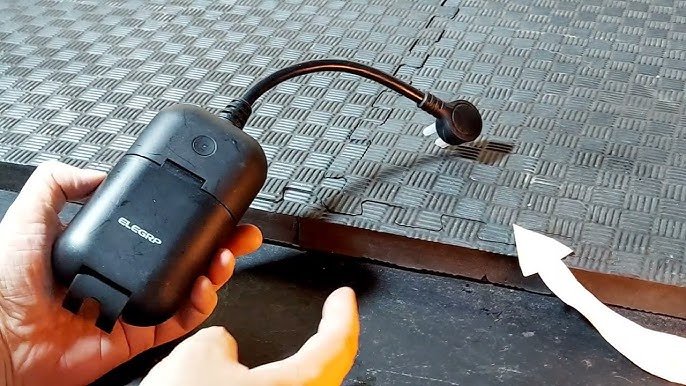
Smart plugs for outdoor use let you control lights easily from your phone. These devices connect to your home Wi-Fi and work with apps. You can turn lights on or off without going outside. Set schedules or timers to save energy and add security. Outdoor smart plugs must handle weather and tough conditions.
Weatherproof Options
Outdoor smart plugs need protection from rain, snow, and dust. Look for plugs with a high IP rating, like IP44 or higher. These plugs resist water splashes and dirt. A sturdy casing keeps internal parts safe. Some models have covers for the sockets. These covers close when not in use. This design prevents water from entering.
Weatherproof plugs last longer outdoors. They work well in gardens, patios, or driveways. Choose plugs made with durable plastic or rubber. These materials stand up to sun and cold. Safe plugs avoid electric shocks and short circuits.
Energy Monitoring Features
Some smart plugs show how much power your lights use. This feature helps track energy consumption. The phone app can display daily or monthly use. You can find ways to reduce electricity bills.
Energy monitoring also alerts you about unusual power spikes. This might mean a problem with the light or wiring. You can act fast to fix issues. Saving energy is good for the environment and your wallet.
Installing Smart Light Switches
Installing smart light switches is a straightforward way to bring your outdoor lighting under control using your phone. These switches replace your existing wall switches, allowing you to manage your lights remotely or set schedules for automatic operation. Before you start, understanding the basics of wiring and the different switch designs can make the process smoother and safer.
Wiring Basics
Smart switches usually require a neutral wire to function, which might not be present in older homes. Checking your existing wiring setup before purchasing a switch saves you from unexpected complications. You can often find the neutral wire in the switch box as a bundle of white wires connected together.
Turn off the power at the breaker before you touch any wires. Safety first! Use a voltage tester to confirm no electricity is flowing. Then, connect the smart switch wires to the corresponding wires in your wall box, typically black (live), white (neutral), and green or bare copper (ground).
If you’re unsure about the wiring, consulting a professional electrician is a wise move. A poor connection can damage your smart switch or cause safety hazards. Remember, a well-installed switch ensures reliable control over your outdoor lights from your phone.
Switch Design And Styles
Smart switches come in various designs to fit your home’s style and needs. You can choose from traditional toggle switches, rocker switches, or even touch-sensitive panels. Some models include LED indicators or customizable buttons for easier control.
Think about the look and feel you want in your outdoor areas. Do you prefer a minimalist design or something more decorative? Also, consider features like dimming capability or compatibility with voice assistants if those matter to you.
Choosing the right switch design not only enhances your home’s aesthetics but also improves your daily interaction with outdoor lighting. What style will make you excited to control your lights every day?

Credit: www.amazon.com
Using Smart Hubs
Using smart hubs is a simple way to control outdoor lights with your phone. These hubs act as the brain of your smart home system. They connect your outdoor lights to your phone through an app. This lets you turn lights on or off, set schedules, and create scenes from anywhere.
Smart hubs support many types of smart devices. They help all your gadgets work together smoothly. You do not need separate apps for each device. A single hub app controls everything, saving time and effort.
Popular Hubs Available
- Amazon Echo Plus:Offers built-in Zigbee support for many smart lights.
- Samsung SmartThings Hub:Works with a wide range of brands and protocols.
- Google Nest Hub:Integrates well with Google Assistant and smart devices.
- Apple HomePod Mini:Ideal for users invested in Apple’s ecosystem.
- Hubitat Elevation:Provides local control with less cloud dependence.
Integrating With Other Devices
Smart hubs allow outdoor lights to work with sensors and switches. For example, a motion sensor can turn lights on automatically. You can also set lights to dim when watching TV.
Many hubs connect to voice assistants. This lets you control lights by speaking commands. The hub syncs with thermostats, cameras, and alarms. This creates a safer and more energy-efficient home environment.
Mobile Apps For Control
Mobile apps offer a simple way to control outdoor lights from anywhere. These apps connect your phone to smart lighting systems. You can turn lights on or off, change colors, and adjust brightness. Many apps also let you create schedules for automatic lighting. This saves energy and adds convenience. Using mobile apps makes managing your outdoor lights easy and fun.
Top Apps For Android And Ios
Several apps work well on both Android and iOS devices. Here are some popular choices:
- Philips Hue:Controls a wide range of smart lights with easy setup.
- LIFX:Offers bright colors and no hub required.
- TP-Link Kasa:Supports various smart bulbs and plugs for outdoor use.
- Magic Home:Great for LED strip lights with color options.
- Smart Life:Works with many brands and smart home devices.
These apps offer reliable control and useful features for outdoor lighting.
Setting Up Schedules And Scenes
Scheduling lights helps save power and increases security. Apps let you set specific times for lights to turn on or off. You can create scenes to match moods or activities. For example, a “Relax” scene might dim lights softly. A “Party” scene could use bright, colorful lights.
Most apps allow:
- Daily or weekly schedules
- Custom scenes with different colors and brightness
- Control of multiple lights at once
Setting up schedules and scenes makes your outdoor space inviting and safe at all hours.

Credit: www.amazon.ca
Voice Control Integration
Voice control integration lets you manage outdoor lights without lifting a finger. Speak simple commands to turn lights on or off, change colors, or adjust brightness. This hands-free control adds convenience and safety, especially at night or when your hands are full.
Using Alexa And Google Assistant
Alexa and Google Assistant connect easily with most smart outdoor lights. Set up the devices using their apps on your phone. Once connected, say commands like “Alexa, turn on the porch lights” or “Hey Google, dim the garden lights.”
Both assistants recognize natural speech. You don’t need to memorize complex phrases. They respond quickly and can control multiple lights at once. Voice control works from anywhere in your home or yard as long as the devices have power and Wi-Fi.
Custom Voice Commands
Creating custom voice commands makes control even simpler. Use the Alexa or Google Assistant app to set personalized phrases. For example, you can say “Movie time” to dim your outdoor lights automatically.
Custom commands save time and reduce mistakes. They also let you create moods or scenes for different activities. This feature works well for parties, relaxing evenings, or security lighting.
Automation With Sensors
Automation with sensors brings smart control to outdoor lighting. Sensors detect changes in the environment and trigger lights automatically. This saves energy and increases convenience. Using your phone, you can customize how sensors react to different situations. The result is a responsive and efficient lighting system that works without manual switches.
Motion Sensors
Motion sensors detect movement near your outdoor lights. When someone approaches, the lights turn on instantly. This feature improves safety by illuminating dark areas only when needed. You can set the sensor’s range and sensitivity through your phone app. It helps avoid false triggers from small animals or passing cars. Lights turn off automatically after no motion is detected, saving power.
Light And Temperature Sensors
Light sensors measure natural daylight to control outdoor lighting. The lights switch on at dusk and off at dawn without any manual input. You can adjust the brightness level and timing on your phone. Temperature sensors monitor weather changes that may affect lighting needs. For example, they can trigger lights during cold, foggy conditions for better visibility. These sensors help maintain comfort and safety efficiently.
Troubleshooting Common Issues
Controlling outdoor lights with a phone is easy, but issues can happen. Troubleshooting helps fix common problems fast. Understanding the root cause saves time and frustration.
Connectivity Problems
One main issue is losing connection between the phone and lights. This can happen due to Wi-Fi signal loss or weak Bluetooth range. Check these points to fix connection problems:
- Make sure the phone and lights are on the same Wi-Fi network.
- Restart your router and the light control device.
- Move closer to the light’s hub or router to improve signal strength.
- Check if the light device firmware needs an update.
- Turn off other devices that may cause Wi-Fi interference.
App Malfunctions
Sometimes the app controlling your lights may freeze or crash. This stops commands from working properly. Try these tips to solve app issues:
- Close the app completely and reopen it.
- Update the app to the latest version in the app store.
- Clear the app’s cache and data in your phone settings.
- Uninstall and reinstall the app if problems continue.
- Check app permissions to ensure it can access necessary functions.
Frequently Asked Questions
How Do I Connect Outdoor Lights To My Phone?
You connect outdoor lights via smart bulbs or smart plugs. Use compatible apps like Philips Hue or TP-Link Kasa. Connect through Wi-Fi or Bluetooth for remote control. Ensure your phone and lights share the same network for seamless operation.
What Apps Work Best For Controlling Outdoor Lights?
Popular apps include Philips Hue, LIFX, and TP-Link Kasa. These apps offer user-friendly interfaces and robust features. They support scheduling, dimming, and color changes. Choose apps compatible with your smart lighting system for optimal results.
Can I Control Outdoor Lights Remotely With My Phone?
Yes, remote control is possible if lights connect via Wi-Fi. Use the associated app to turn lights on or off anywhere. Ensure your phone has internet access for remote management. This feature adds convenience and energy savings.
Are Smart Outdoor Lights Energy-efficient?
Smart outdoor lights often use LED technology, which saves energy. They allow scheduling and dimming to reduce unnecessary power use. Remote control helps avoid leaving lights on accidentally. Overall, they help lower electricity bills effectively.
Conclusion
Controlling outdoor lights with your phone makes life easier and safer. You can turn lights on or off from anywhere. Set timers to save energy and money. Adjust brightness to fit your mood or event. Many apps offer simple steps for quick setup.
This smart control adds comfort and convenience to your home. Try it today and enjoy the benefits of smart lighting.

